How to Use Airpods Pro 3 (Pairing, ANC, Live Translation, Heart Rate & Reset)
By - Che Browndon
Written-on - December 12, 2025
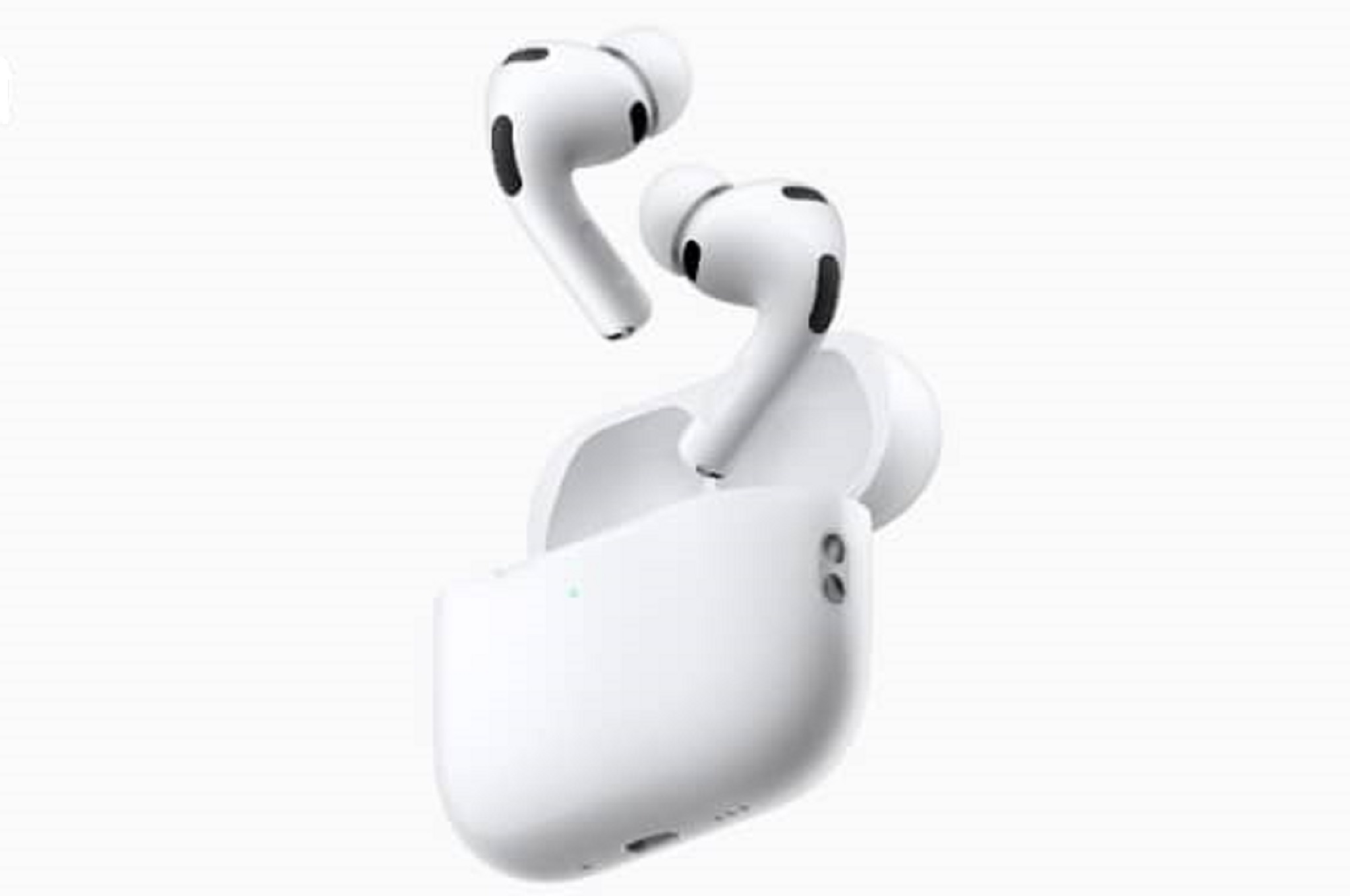
AirPods Pro 3 are Apples newest pro earbuds with features such as noise cancellation,
Spatial Audio, live translation and heart rate sensor. This article is going to reveal how to pair the AirPods pro 3 to iPhone and non-Apple Devices, how to use live translation for face-to-face chats, how to check heart rate data in the Fitness app and how to reset the buds if they cause problems. Some tips will also be included that you’ll find helpful.
Whats New With AirPods Pro 3 (Spec Overview)
The Apple Airpod Pro 3 improves on previous models with up to 8 hours of listening with ANC (Active Noise Cancellation) on, IP57 dust/water resistance, Spatial Audio with head tracking, and a redesigned for better passive isolation. The major hardware additions include an in-ear PPG heart rate sensor for tracking workouts and calories and support for Live Translation via Apple Intelligence and compatible iPhones. There are also battery and ANC improvements when compared to Apple AirPods Pro 2. These improvements have been highlighted in early reviews of this new gadget.
How to Pair or Connect Airpods Pro 3
On iPhone or iPad:
First make sure you device is unlocked and your Bluetooth is on then Open the AirPods Pro 3 case near the device. When you do this the setup animation should appear automatically. A popup will show on your Apple device showing a big “connect" button. Tap Connect and then you follow the prompts to enable features like Noise Control, Transparency Mode, and Spatial Audio.
After the setup, AirPods Pro 3 will sync across all your Apple devices signed into the same iCloud account, and you can switch seamlessly between iPhone, iPad, and Mac. You can also customize controls under Settings -> Bluetooth -> AirPods Pro 3.
On Android or other Bluetooth Devices
To connect the AirPods Pro 3 on Android and other Bluetooth Device, put the AirPods in the charging case, open the lid and leave it open then you double-tap the front of the charging case until the LED flashes white. Open your Android or other devices Bluetooth settings and choose AirPods Pro 3 from the list. I also want to point out that advanced features like Live Translation, heart rate sensing, and automatic device switching require iOS and Apple Intelligence on compatible Apple devices.
If pairing fails, restart Bluetooth on your device, close and reopen the case, or reset the AirPods. Also ensure your device is updated to the latest OS version for best compatibility.
How to Use Live Translation in AirPods Pro 3
In order to use Live Translation in Airpods Pro 3, you’ll need a compatible iPhone (iPhone 15 Pro or later) with the latest iOS and Apple Intelligence enabled. The AirPods Pro 3 firmware also need to be up to date. This update happens automatically near an iPhone. Live Translation also requires internet connection to work.
Before you start, your iPhone must be unlocked, your Bluetooth should be turned on and AirPods Pro 3 connected to the iPhone. The Apple Translate app should also be installed and required languages downloaded in the Translate app.
To use Live Translation in AirPods Pro 3, open the Translate app on your iPhone, Tap the “Live” Tab, choose the two languages you want to translate between(for instance language A pertaining to the other person and language B pertaining to you). Tap Start or the microphone button and speak naturally and clearly. The Translations will play in your AirPods and the other person can hear translations from the iPhone Speaker.
Another method is for you to say: Hey Siri, Start Live Translation after languages are already selected in the Translate app. Live translation will begin immediately and audio will play through your AirPods Pro 3.
The Final method is to press and hold the stem on both AirPods at the same time after setup in the Translate app. Live Translation will instantly begin and you’ll hear the translations directly in your ear.
Supported languages include English(UK & US), French, German, Portuguese (Brazil), Spanish, Italian, Japanese, Korean, Chinese(a simplified version). Live Translation is an apple first feature so it works only on Apple devices and not supported on Android.

AirPods Pro 3 Heart Rate Monitoring: What it does and How to View Data
The AirPods Pro 3 include an in-ear optical heart rate sensor (Photoplethysmography) that uses infrared light to estimate your pulse by detecting changes in blood flow through your ear. When paired with a compatible iPhone and Apple Intelligence, this sensor can record heart rate automatically during supported workouts like walking, running, cycling, or other activities tracked in the Fitness app.
To view heart rate data in Apple AirPods Pro 3, open Apple’s Fitness app (or Health app) on your iPhone and start a workout (Outdoor walk, run etc.). You’ll see heart rate trends, calories burned, and other metrics during the workout. Apple has also revealed to the public that the ear based sensors of these AirPods are great for general tracking but it may be less accurate when compared to dedicated chest straps or wrist sensors during very intense or erratic workouts. To get better results, position your AirPods Pro 3 very well, keep your firmware up to date, and use iOS devices with Apple Intelligence Enabled.
How to Reset Apple AirPods Pro 3 (plus Troubleshooting)
You can reset your Apple AirPods Pro 3 if it isn’t working well. To do this, place both earbuds in the charging case and close the lid. Wait about 30 seconds and open the lid. Double-tap the front of the case while the light is on. Double-tap a second time when the status light flashes white and Double-tap a third time when the status light flashes faster. After those sequences, the status light will flash amber, then white indicating the AirPods Pro 3 have been reset and ready to pair again.
If you face issues such as one ear audio imbalance, try toggling Mono Audio or adjusting Audio Balance in Accessibility settings. If battery drainage seems high, check for the latest firmware updates via your iPhones’s Bluetooth settings and disable unnecessary features like Spatial Audio or custom touch shortcuts. You can also contact Apple Support if you face a serious problem that you can’t find any resolution to.
AirPods Pro 3 Tips and Good Settings to Try Out
You can Personalize Noise Control in Settings -> Bluetooth -> AirPods Pro so the ANC and transparency match your environment. You can use the “Find My” app to locate lost earbuds and keep the case charged (using the MagSafe or Qi). You should always check AirPods firmware and iPhone iOS regularly to make sure there are no issues.
Closure
Apple AirPods Pro 3 is very easy to pair, it has live translation and also has heart rate tracking via the ear. Even with all these features, it still delivers a world class ANC. This article has provided the steps for pairing, live translation, heart rate tracking and reset to use the AirPods Pro 3 well to get the best experience out of these earbuds.
Related
How to Connect the SteelSeries Arctis Nova 1 to Any Device (PS5, PC, and More)
The SteelSeries Arctis Nova 1 is a lightweight and wired gaming headset built around the
Universal......................
Written by - Che Browndon

PlayStation Plus vs. Xbox Game Pass Ultimate (2025): Which Subscription is Worth It?
There’s a lot of discussion online about PlayStation Plus and Xbox Game Pass
Ultimate in 2025. Gamers are......................
Written by - Che Browndon

Marvel Rivals Season 4.5 Adds Daredevil and Cross-Progression
Daredevil will be coming to Marvel Rivals on October 10, 2025
as the 43rd Hero of......................
Written by - Che Browndon

What role does Emma Frost play in Marvel Rivals?
Emma Frost plays the Vanguard role in Marvel Rivals which makes her a powerful frontline
hero......................
Written by - Che Browndon

Borderlands 4 Vault Hunters: All Characters, Classes & Best Builds
Borderlands 4 will feature several Vault Hunters, each with unique classes
and abilities......................
Written by - Che Browndon
How to Enable Voice Chat (VC) in Roblox: Step-by-Step Guide
Voice Chat in Roblox allows players to communicate in real-time with others making
the game.....................
Written by - Che Browndon

Who Plays James Bond in 007 First Light? Cast & Voice Actor Explained
James Bond in 007 First Light is voiced or played by
Irish Actor.....................
Written by - Che Browndon

007 First Light Release Date, Platforms & Gameplay Details
007 First Light is an upcoming action adventure James Bond game developed
by IO Interactive. The game.....................
Written by - Che Browndon

Hollow Knight: Silksong Release Date and Nintendo Switch Info
After 6 years of anticipation, Hollow Knight: Silksong’s release date has
finally been revealed.
.....................
Written by - Che Browndon

Esports Nations Cup: Format, Teams, Prize & How to Watch
Esports Nations Cup is a new tournament announced by Esports World Cup Foundation
(EWCF), where.....................
Written by - Che Browndon

‘OOF’ Returns to Roblox. Why did Roblox Remove the OOF Sound
Roblox just recently announced the ‘OOF’ sound effect will be returning to the game meaning users will
be able to use the sound effect once more.....................
Written by - Che Browndon

How to Get Celestial Mutation in Grow a Garden
Grow a Garden is a popular Roblox game that lays emphasis on farming
such as planting seeds, watering plants, harvesting crops and much more. The game also has mutations
...................
Written by - Che Browndon

How to Get Lemon in Grow a Garden Roblox
The Lemon Seed/fruit is extremely popular in Grow a Garden Roblox. This isn’t only because
of how good it looks but how rare or scarce it is.
...................
Written by - Che Browndon

All Oasis Egg Pets in Grow a Garden Roblox Explained
On June 28 2025, a new Grow a Garden update was revealed which is known as the Oasis Egg.
Grow a Garden is a Roblox game mode were player can plant, grow and manage a
...................
Written by - Che Browndon

Ubisoft Brings 16 Games to Xbox App on PC, Including Assassins Creed Shadows
Ubisoft is a video game development company based in France and one of the largest in the world. Most
Video Game fans are aware of
...................
Written by - Che Browndon

Xbox Fans Disheartened By Game Console Price Increase. What You Should Know
Officially Launching on November 10, 2020, Microsoft Xbox Series X and Series S are two of the most recent console releases from tech giant Microsoft.
...................
Written by - Che Browndon
Copyright © 2025 ComicCone.com. All Rights Reserved